
You know the algebra. You have practised the formulas. Yet a question with awkward numbers still takes three minutes—and leaves you rushing later.
Desmos can help. Built into Bluebook, it lets you graph equations, compare functions and check calculations during SAT Math. Bluebook currently offers both graphing and scientific calculator options. This 2027 preparation guide uses those currently published features.
The best digital SAT Desmos calculator hacks save work without replacing understanding. You still need to decide what the question means and which result answers it.
If you are scoring 1200-1400, calculator fluency can help reduce avoidable Math errors. If you are aiming for 1500+, it can preserve time for problems that need deeper reasoning.
When Should You Use Desmos?
Use this decision rule: If you can see a short, reliable algebraic route, take it. If the question needs repeated calculations, awkward roots or intersections, consider Desmos.
For 3x + 5 = 20, manual solving is faster. For a system with decimal coefficients, graphing may involve less work.
Ask what you need: an exact expression, a numerical answer, a maximum or a point satisfying two conditions. That choice determines your method.
Good Digital SAT Math time management also means knowing when to move on. Combine these techniques with a Digital SAT pacing strategy and measure your own solving times.
15 Practical Desmos Calculator Hacks
The examples below are original practice illustrations. Type each expression yourself before trying the method under time pressure.
1. Solve Quadratic Equations Through Their Zeros
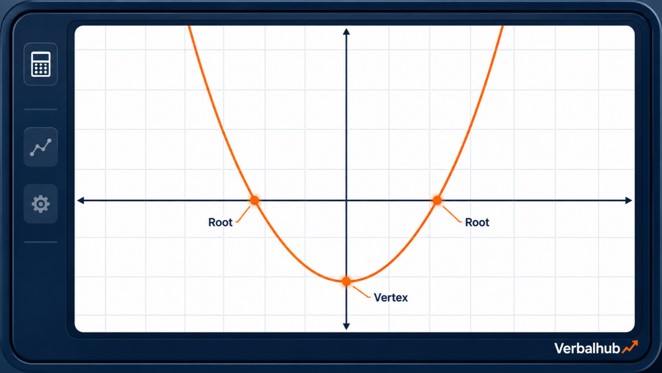
To learn how to solve quadratic equations with Desmos, start by moving everything to one side. Enter that expression as y = and select its x-intercepts.
Example: For x² - 5x - 14 = 0, enter y = x² - 2 - 5x - 14. The intercepts give x = -2 and x = 7.
If the question asks for the positive solution, answer 7.
Benefit: This avoids a lengthy quadratic-formula calculation when factoring is difficult. For this simple example, factoring may still be faster; use it to learn the graphing process first.
2. Read the Vertex, Symmetry and Intercepts Together
Graph a quadratic and inspect its turning point and axis crossings. These features answer different questions, so label them before choosing a response.
Example: Enter y = x² - 6x + 5. The vertex is (3, -4), the axis of symmetry is x = 3, the roots are 1 and 5, and the y-intercept is (0, 5).
The minimum value is -4; the x-value producing it is 3.
Benefit: One graph can check several features and prevent the common mistake of reporting the vertex's x-coordinate when the question asks for its minimum y-value.
3. Solve Linear Systems Without Rearranging Both Equations
For how to solve systems of equations with Desmos, graph both equations on separate lines. Select their intersection and read the coordinates in the requested order.
Example: Enter 2x + y = 11 and x - y = 1. They intersect at (4, 3), so x = 4 and y = 3.
Desmos accepts these equations without first converting them into slope-intercept form.
Benefit: This removes some substitution or elimination work, especially with inconvenient coefficients. Still check whether the question wants x, y, x + y, or another expression.
4. Find Both Solutions to a Line-Parabola System
Enter the line and parabola separately, then look for every intersection. A system may have zero, one or two real solutions.
Example: Graph y = x² and y = x + 2. The intersections are (-1, 1) and (2, 4).
If the question asks for the sum of the x-coordinates, calculate -1 + 2 = 1.
Benefit: Seeing both crossings helps prevent an incomplete answer. If only one appears, adjust the viewing window before deciding that the other does not exist.
Apply this habit when practising hard Digital SAT Module 2 questions.
5. Check a Proposed Solution by Substitution
Use a numerical evaluation when you already have a candidate answer. You often do not need a graph to verify it.
Example: You obtain x = 6 for 3(x - 2) = 12. Type 3(6-2) and check that the result is 12.
For a system, substitute the proposed coordinates into both equations.
Benefit: This catches sign and arithmetic mistakes with very little typing. It is especially useful after a long handwritten solution, but checking one equation alone cannot confirm a system's solution.
6. Use Inequality Shading to Test Feasible Points
If you are learning how to use Desmos for inequalities, enter the inequality exactly, including its boundary symbol. For a system, valid points must satisfy every inequality; overlapping shading represents the shared region. Desmos supports inequality shading and restrictions.
Example: Enter y = 2x + 1 and y < 5. The point (1, 4) satisfies both because 4 ≥ 3 and 4 < 5.
A point on y = 5 is excluded.
Benefit: Shading makes candidate-point questions easier to inspect. Confirm the inequalities numerically when a point lies near a boundary.
7. Build Function Tables Instead of Repeating Arithmetic
Define a function, add a table, and enter the required inputs in its x-column. Put f(x_1) in the next column to calculate corresponding outputs; Desmos also supports comparing functions in adjacent columns.
Example: Define f(x) = 2x² - 3x + 1. For inputs 0, 1 and 2, the outputs are 1, 0 and 3.
Use the table feature when several substitutions are required.
8. Find Where Two Quantities Become Equal
Graph two expressions as separate functions and check the intersection point. Interpret each coordinate using the problem's units.
Example: Two rental plans cost 30 + 8x and 12 + 11x dollars. Enter y = 30 + 8x and y = 12 + 11x.
The intersection (6, 78) means both plans cost $78 after six hours.
Benefit: This answers a break-even question without repeated trials. It also separates the time from the cost, preventing you from reporting 78 when the question asks "after how many hours?"
9. Handle Absolute Value With a Graph and a Boundary Check
Type absolute value using abs(...). Graph an equation against a horizontal line, or enter an inequality directly.
Example: Enter y = abs(2x - 3) and y = 5. The intersections give x = -1 and x = 4.
For |2x - 3| ≤ 5, the solution is -1 ≤ x ≤ 4, including both endpoints.
Benefit: This helps you remember both branches. It also shows why an absolute-value inequality may describe an interval rather than two isolated answers.
10. Fit a Regression Model to Numerical Data
Enter the supplied data into a table, then type y_1 ~ mx_1 + b for a linear regression. Use the tilde ~, rather than an equals sign, to fit the model.
Example: Enter (1, 3), (2, 5.2), (3, 6.8) and (4, 9). The fitted line is approximately y = 1.96x + 1.10, predicting 10.9 when x = 5.
Benefit: This avoids calculating a best-fit line manually. Use regression when numerical data are supplied; do not spend time estimating every point from a scatterplot image or assume every relationship is linear.
11. Compare Transformations Against the Parent Function
Graph the original function and its transformed version together. Identify horizontal and vertical movement before checking the graph.
Example: Compare y = x² with y = (x - 3)² + 2. The second parabola moves three units right and two units up, placing its vertex at (3, 2).
Changing the coefficient outside the square would affect its shape or reflection.
Benefit: The comparison catches the familiar left-versus-right error. Remember that x - 3 moves the graph right, even though the expression contains a minus sign.
12. Check Domain and Range, Then Justify the Endpoints
Use a graph to inspect possible inputs and outputs, but confirm restrictions algebraically. Add conditions in curly brackets when the problem limits the domain.
Example: Graph y = sqrt(9-x²). The domain is [-3, 3], since 9 - x² ≥ 0; the range is [0, 3].
For a model valid only when 0 ≤ x ≤ 2, add {0 < x < 2}.
Benefit: This prevents using values outside a model's permitted interval. A graph supports your reasoning; its visible window cannot prove a function's complete domain or range.
13. Solve Exponential Equations With a Horizontal Target
Graph the exponential expression and the required output separately. Their intersection supplies the input that reaches the target.
Example: For 500(1.2)ˣ = 864, enter y = 500(1.2)ˣ and y = 864. The intersection gives x = 3.
Check: 500(1.2)³ = 864.
Benefit: This can avoid logarithm calculations. If a question asks when a quantity first exceeds a target in whole years, interpret the crossing carefully and test the relevant integer years.
14. Turn a Mixture Story Into Two Expressions
Define the unknown and write the model before typing. Rates, mixtures and growth questions become easier only after the quantities and units are correctly represented.
Example: Add x litres of 50% solution to two litres of 20% solution to make a 30% mixture. Graph y = 0.4 + 0.5x and y = 0.3(2 + x).
They intersect at x = 1, so add one litre.
Benefit: Graphing reduces algebra after the setup. It cannot catch a faulty model automatically: the left side represents pure substance, while 2 + x represents total mixture volume.
15. Control Parentheses, Precision and the Graph Window
Enter grouped expressions carefully, then check whether the display matches the original equation. Zoom out when a reasonable solution is missing.
Example: For (x + 1)/(x - 2) = 2, type y = (x + 1)/(x - 2) and y = 2. Their intersection gives x = 5; x = 2 remains excluded.
Typing x + 1/x - 2 creates a different expression.
Benefit: This prevents entry errors and false conclusions from a narrow window. Treat displayed decimals as approximations; use algebra when the answer requires an exact fraction, radical or parameter expression.
How to Use Desmos Without Losing Time
These Digital SAT Math calculator tips work best with a consistent three-step method.
- Read the question first. Identify the requested quantity. "Find x" and "find x + y" require different final actions.
- Decide whether Desmos is genuinely faster. Compare typing and graph inspection with a short manual solution. Avoid opening a table for one easy calculation.
- Use the calculator to verify rather than replace reasoning. Set up the relationship yourself, use Desmos for computation or graphing, and check that the result fits the question.
For example, Desmos may display a negative intersection in a distance problem. That point can be mathematically valid while failing the situation's restrictions.
Practise these decisions until choosing the method becomes part of solving.
Common Desmos Mistakes on Digital SAT Math

Students often learn several Desmos SAT Math tricks but lose their advantage through small habits.
- Entering equations incorrectly: Check minus signs, exponents, denominators and parentheses before studying the graph.
- Graphing every question: Simple arithmetic, familiar factors and direct formula substitutions may be quicker manually.
- Misreading inequality shading: A point must satisfy all conditions. Dashed boundaries exclude equality; solid boundaries include it.
- Forgetting restrictions: Time, length and population usually have contextual limits.
- Typing long equations unnecessarily: Simplify safe common factors or constants first when that clearly reduces work.
- Rounding too early: Keep precision until the final answer and follow the response instructions.
- Confusing coordinates: Identify which variable measures time, cost, distance or another quantity.
Also, a visible gap or apparent touch does not always settle an exact algebraic question. Closely spaced roots and tiny holes can be difficult to judge from a graph.
Turning Calculator Fluency Into a 700+ Math Goal
For Digital SAT Math 700+, speed matters because it gives you room to read carefully and review uncertain work. It does not remove the need for geometry, algebraic structure or word-problem reasoning.
Students around 1200-1400 should first target repeated setup errors and slow routine calculations. High achievers should also practise questions where graphing provides only part of the solution, particularly unknown-coefficient and exact-value problems.
Digital SAT adaptive testing uses first-module performance to help determine the second-module question mix. Build accuracy in both modules rather than treating the first as a warm-up.
Use the Digital SAT score guide to connect your Math goal with your overall target. The SAT score calculator guide explains why a correct-answer count cannot provide a guaranteed score.
Desmos Practice Plan for the Digital SAT
Use official questions from College Board's Student Question Bank and full-length Bluebook practice tests. These resources let you combine targeted practice with the actual testing interface.
| Day | Practice task | Review focus |
|---|---|---|
| 1 | Learn entry controls; solve six quadratics. | Roots, vertex and requested quantity |
| 2 | Solve eight linear and nonlinear systems. | All intersections and coordinate order |
| 3 | Practise inequalities and absolute value. | Boundaries, overlap and intervals |
| 4 | Build function tables and fit small datasets. | Inputs, outputs and model choice |
| 5 | Solve growth, rate and mixture problems. | Equations, units and restrictions |
| 6 | Complete a timed mixed set of 12 questions. | Method choice, accuracy and time |
| 7 | Take a full Bluebook practice test. | Calculator decisions under test conditions |
For every error, record the question type, chosen method, time taken and cause. Separate typing mistakes from conceptual mistakes.
Then redo missed questions without viewing the solution. Keep some official questions unseen so later mock results remain useful.
Frequently Asked Questions
Yes. Bluebook includes Desmos for the Math section, with graphing and scientific options. Practise with the embedded calculator before test day and check College Board's policy for updates.
No. It can handle many calculations, graphs and numerical equations, but you must interpret the problem. Geometry relationships, exact expressions and questions involving unknown parameters may still need substantial reasoning.
Use it in both when it makes your solution faster or more reliable. Choose according to the question, not the module number. Avoid spending extra time graphing a problem you can solve directly.
It can reduce routine calculation errors and save time for demanding questions. Reaching 700+ also requires accurate setup, broad topic knowledge and regular review. Calculator fluency alone does not guarantee a score.
Start in Bluebook's test preview, then use official practice tests and targeted question sets. Practise entering expressions, selecting intersections, changing the window and checking answers under timed conditions.
Also Preparing for IPMAT?
Students balancing SAT preparation with management entrance exams may benefit from a personal plan. Through Verbalhub IPMAT one-on-one coaching, a mentor can identify repeated mistakes, adjust pacing practice, review mock-test errors and focus on specific weaknesses.
Hasan Sir, Verbalhub's lead verbal mentor, is an IIM Kozhikode alumnus with around 20 years of teaching and mentoring experience. His work in MBA entrance preparation and guidance covers CAT, GMAT, XAT, and SNAP verbal training, with a focus on reading comprehension, reasoning, accuracy, time management and exam strategy.
That approach—diagnosis, personal feedback and error correction—supports preparation built around each student's needs.

Conclusion: Practise Choosing the Right Tool
Mastering Desmos for Digital SAT Math means knowing what to type, what the result represents and when manual work is quicker.
Start with two or three techniques. Compare them with your usual methods, record errors and build speed through accurate repetition.
For structured support, Verbalhub offers Digital SAT Online Coaching and a Mock Test Series. Guided practice, timed mock analysis and personal feedback help students turn calculator speed into better decisions and measurable progress.
You can also explore Verbalhub SAT preparation for further practice and strategy.
Prepare With a Clear Plan. Personalised guidance. Focused practice. Book a Free Demo.